Filing a Washington State court form can feel like navigating a bureaucratic maze, and a single oversight often triggers a costly delay. Legal professionals and self‑representing litigants alike report that simple errors—missed checkboxes, incorrect dates, or unsupported attachments—are the leading cause of rejections. This guide pulls together seasoned advice and real‑world examples to show how you can sidestep those pitfalls and keep your case moving forward.
Why a Perfect‑Looking Form Still Gets Sent Back
Even when the template appears complete, Washington courts apply strict formatting rules. Missing a required signature line or using a non‑standard font can render a document invalid. The state’s eFiling system automatically checks for compliance, but it only flags obvious gaps. Subtle mismatches—like a date formatted as MM/DD/YY instead of MM/DD/YYYY—often slip through, only to be caught by a clerk during review.
Three Mistakes That Lead to Immediate Rejection
Below are the most frequent reasons a court will bounce a filing back to the submitter.
1. Inconsistent Party Information
When the plaintiff’s name, address, or case number differs across the cover sheet, notice, and supporting exhibits, the clerk cannot verify identity. Double‑check that every page uses the exact same spelling and contact details.
2. Unsupported Attachments
Electronic filings must be in PDF format, and each file cannot exceed 25 MB. Attempts to attach Word documents, scanned jpgs, or oversized PDFs trigger an automatic rejection. Converting all exhibits to a single, properly sized PDF eliminates this hurdle.
3. Missing Mandatory Checkboxes
Many Washington forms include checkboxes that confirm jurisdiction, service, or fee payment. Failure to tick a box—even if the underlying fact is true—renders the form incomplete. The image below illustrates a typical error pattern that courts flag.
How to Double‑Check Your Attachments Before Submitting
Adopt a short “file audit” routine:
- Open each PDF on a different device to confirm readability.
- Use the “Find” function to search for the case number and ensure it appears on every page.
- Run a file‑size check; if any PDF exceeds 25 MB, split it into separate, logically grouped files.
- Print a hard copy of the first two pages and compare them side‑by‑side with the electronic version to catch formatting oddities.
These steps cost only minutes but save days of re‑filing.
When to Call an Expert: Spotting Hidden Hazards
Complex motions—such as a motion for summary judgment or a petition for a protective order—often require specialized language. An experienced Washington court forms consultant can review the draft, highlight hidden pitfalls, and suggest precise language that satisfies the court’s expectations. The second image shows a more detailed error report typical of a high‑stakes filing.
Implications of Avoiding These Errors
When you file correctly the first time, you avoid:
- Additional filing fees that courts impose for re‑submission.
- Potential prejudice, as delays can weaken a client’s position.
- The administrative burden of tracking multiple case numbers and docket entries.
Conversely, a single missed checkbox can push a case back weeks, forcing parties to renegotiate timelines or risk missing statutory deadlines.
Bottom Line
Washington State court forms are unforgiving about details, but the pitfalls are predictable. By standardizing party information, ensuring PDF compliance, and meticulously ticking required boxes, you dramatically improve the odds of a smooth filing. For high‑impact documents, a brief expert review is a cost‑effective insurance policy that keeps your case on track.
Error Message E02 - Hoover Advice Centre
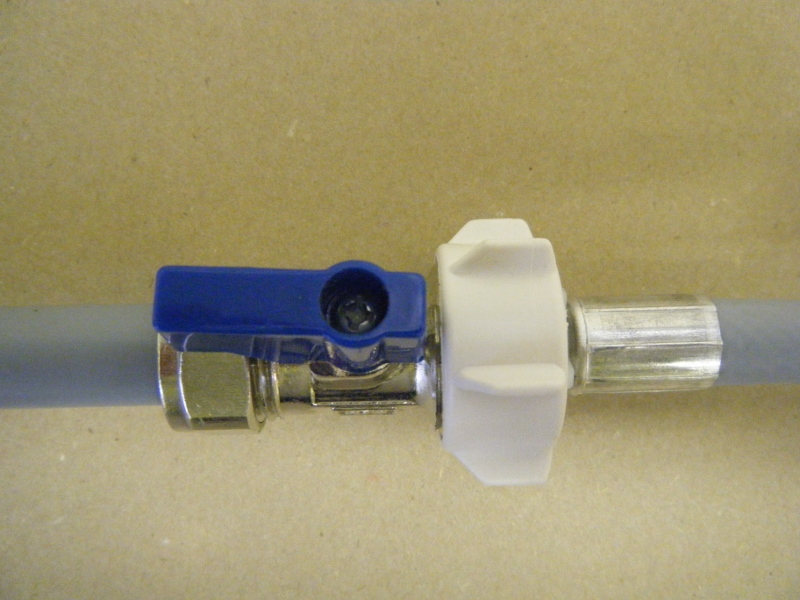
Error message E02 - Hoover Advice Centre
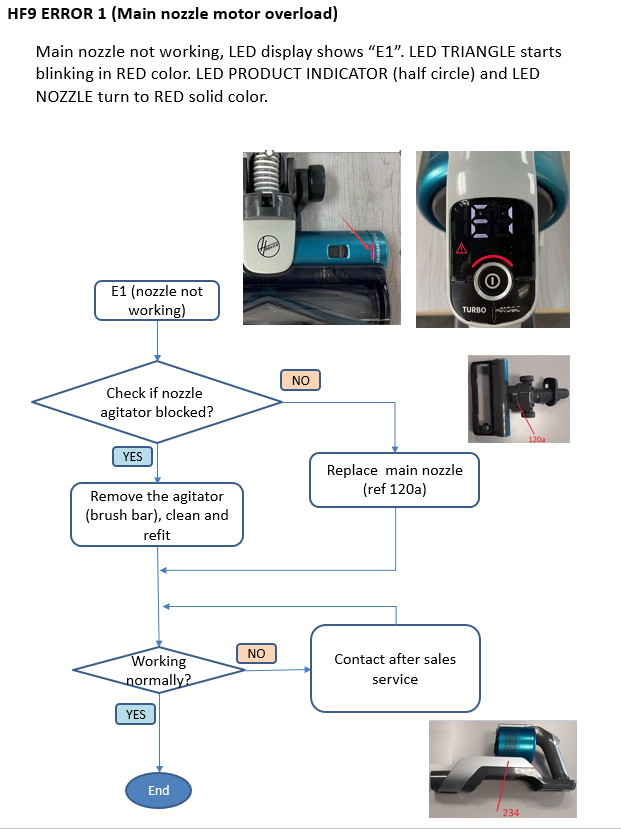
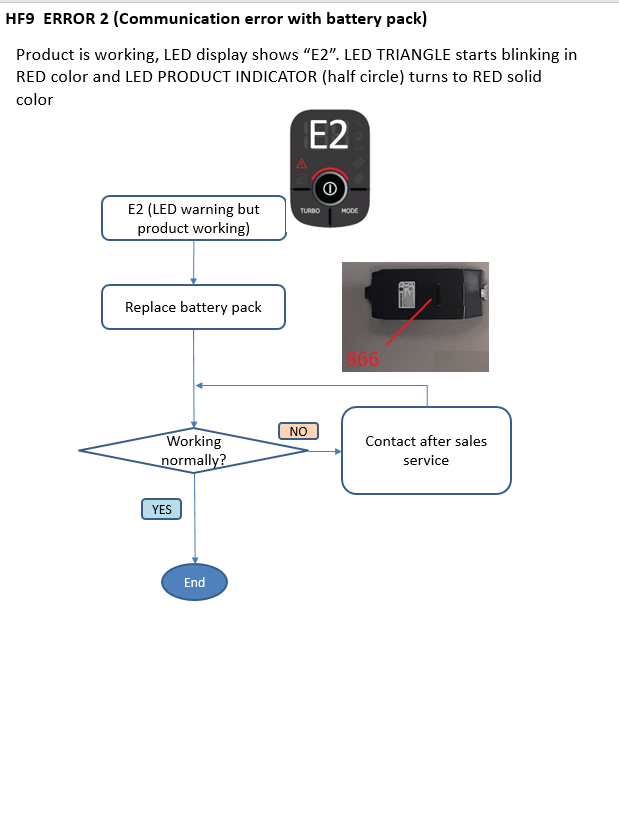
HF9 Fault Finding
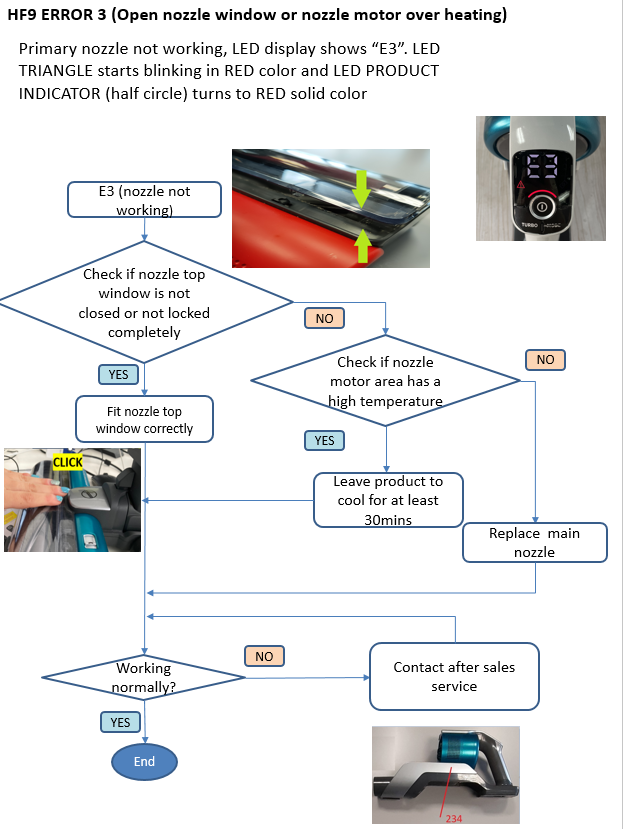
HF9 Fault finding
HF9 Fault Finding
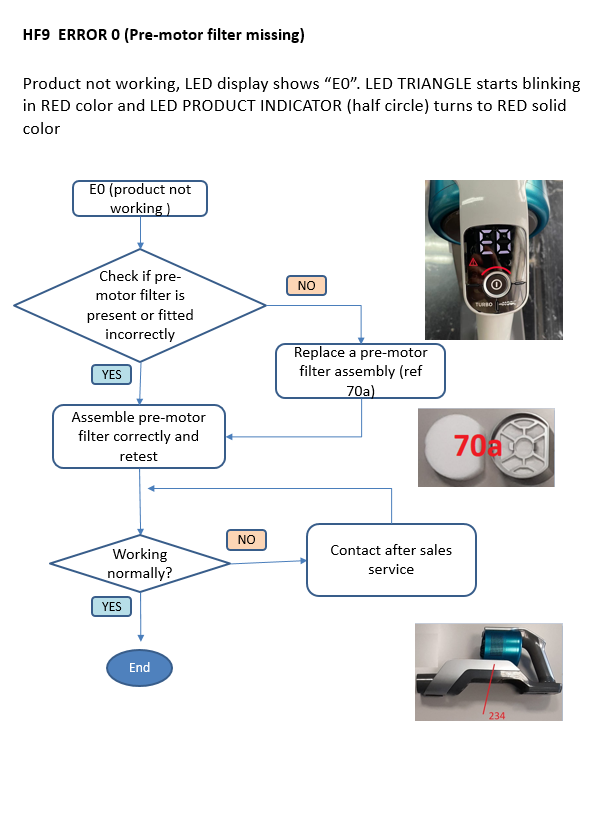
HF9 Fault finding